Chair Lumbar Support Design Principles & Tips are essential for creating a comfortable and ergonomic seating experience. This guide explores the key features that help reduce back strain, improve posture, and provide lasting lumbar support throughout the day.
- 1. Essential Guidelines for Effective Lumbar Support in Chair Design
- 2. Principle One: Contour and Curvature Alignment
- 3. Principle Two: Adjustability is Non-Negotiable
- 4. Principle Three: The Right Firmness and Material
- 5. Principle Four: Integration with Overall Chair Ergonomics
- 6. Principle Five: User-Centric Testing and Feedback
- 7. Common Misconceptions About Lumbar Support
Essential Guidelines for Effective Lumbar Support in Chair Design
Let’s be honest, we’ve all slumped into a chair that promised comfort but delivered a stiff back by lunchtime. The difference between a good chair and a great one often comes down to its lumbar support design principles. Think of your lower back, or lumbar region, as the architectural keystone of your spine. When it’s properly supported, the rest of your posture falls into place naturally. The core idea here isn’t about pushing your spine into an unnatural position, but about gently encouraging and maintaining its healthy, natural inward curve. Ignoring these ergonomic chair design fundamentals is like building a house on a shaky foundation—it might look okay at first, but problems are guaranteed over time.
Principle One: Contour and Curvature Alignment
The first rule of thumb is simple: the support should match the shape of your back. A one-size-fits-all flat panel just won’t cut it. Effective lower back support mechanisms are all about that personalized fit.
Understanding the S-Curve
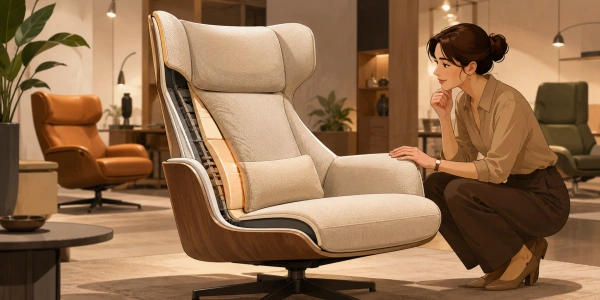
Your spine isn’t straight; it has a gentle S-shape with an inward curve at the lower back called the lordosis. A well-designed lumbar cushion or pad mirrors this curve. You may find chairs described as having “anatomic contouring” or “lordotic support”—these are just fancy terms for a shape that cradles your lumbar spine correctly. When shopping, a key question to ask is, how to choose a chair with proper lumbar support? Look for a clear, pronounced curve in the lower part of the chair back that seems like it would fill the space where your back naturally arches inward.
Principle Two: Adjustability is Non-Negotiable
Here’s a universal truth: bodies are different. My ideal lumbar position will be different from yours. That’s why fixed support often fails. The best chair back support features offer multiple ways to customize the fit.
Height and Depth Matter
You should be able to adjust two things: height and depth (or protrusion). Height adjustment ensures the support hits the right spot on your spine—not too high on your ribs or too low on your tailbone. Depth adjustment controls how much it pushes into your back. Some people prefer a gentle reminder, others need a firmer nudge to maintain posture. This level of adjustable lumbar support criteria is what separates professional office chairs from basic ones. It’s the difference between wearing a tailored suit and one off the rack.
Principle Three: The Right Firmness and Material
It’s not just about shape and position; what the support is made of matters immensely. The material needs to be resilient—firm enough to provide actual support but with enough give to be comfortable over long periods. Memory foam is a popular choice because it conforms to your shape while offering consistent pressure distribution. Mesh backs provide excellent airflow and a dynamic, flexible support that moves with you. When considering lumbar support construction best practices, avoid materials that are too hard (they create pressure points) or too soft (they collapse and offer no support). The goal is a supportive yet forgiving feel.
Principle Four: Integration with Overall Chair Ergonomics
Lumbar support doesn’t work in isolation. It’s one part of a holistic ergonomic seating system. For it to be effective, it must work in concert with the seat pan, the backrest recline, and the armrests. For example, if the seat is too deep, you can’t sit back far enough to use the lumbar support. If the backrest doesn’t recline, you lose the dynamic movement that relieves disc pressure. A great chair design considers how all these elements interact. You can learn more about this integrated approach from resources like the Humanscale ergonomics guide, which explains how balanced posture relies on the whole chair working together.
Principle Five: User-Centric Testing and Feedback
The final principle is perhaps the most important: design for real people. The best principles of spinal support in seating are validated through extensive user trials. This means testing chairs with people of different sizes, weights, and sitting habits. Does the support stay comfortable after two hours? Does it accommodate a slight shift or stretch? This feedback loop is crucial for refining optimal lumbar support specifications. It ensures the chair supports a wide range of users in real-world scenarios, not just in a designer’s sketch.
Common Misconceptions About Lumbar Support
Let’s clear up a few things! First, more support is not always better. An overly aggressive lumbar pad can actually force your spine into an uncomfortable, exaggerated arch. Second, a “lumbar support” label doesn’t guarantee quality—it must be well-designed using the principles we’ve discussed. Finally, remember that even the best support requires you to sit back in the chair to use it. Leaning forward defeats its purpose entirely. The key takeaway? Look beyond marketing and focus on the tangible design elements for back pain relief: adjustability, appropriate contour, and quality integration.
By keeping these five key principles in mind—contour, adjustability, material, integration, and user-testing—you can make a much more informed choice, whether you’re evaluating chairs for your home office or simply understanding what makes your current seat work (or not!). Your back will thank you for it.